























Greenhouse is an applicant tracking system built around structured hiring, standardizing scorecards, interview kits, and decision workflows.
- Primary Features: Structured hiring and scorecards, Real Talent (fraud detection, identity verification, Talent Matching), Voice AI interviewing, candidate sourcing and CRM, career sites, reporting and DEI analytics, and onboarding.
- Starting Price: Pricing is quote-only and not published. Independent estimates place the range around $6,000 to $70,000+ per year depending on company size and tier.
- Best For: Mid-market and enterprise companies, roughly 100 to 10,000+ employees, that hire consistently and want a rigorous, auditable, bias-resistant hiring process.
- Not Ideal For: Small teams hiring occasionally, staffing agencies needing CRM-first client management, or companies that want granular numeric AI match scores rather than categorical candidate sorting.
- Integration: Recruiting teams integrate Skima AI with Greenhouse to deepen candidate screening, talent rediscovery, and match transparency, all without replacing Greenhouse or requiring data migration.
Every ATS with real AI ambitions is currently racing toward full automation. This includes sourcing agents, autonomous screening, and workflows that hardly need a recruiter's approval.
Greenhouse is the one holdout, making it the most interesting platform to evaluate. Its structured hiring model has remained nearly unchanged for over a decade. It starts by defining the scorecard, keeps humans in decision-making roles, and allows AI to assist rather than replace.
I evaluated the Greenhouse platform and every major feature, identified patterns from thousands of verified user reviews, and highlighted where Greenhouse meets expectations and where it slows recruiters down instead of helping them. Let's get started.
What Is Greenhouse?
Greenhouse is a cloud-based applicant tracking system focused on structured hiring, a methodology that defines a role's requirements and evaluation criteria before a job is posted. As a result, every candidate is assessed against the same standard instead of relying on a recruiter's gut feeling. Daniel Chait co-founded the company with Jon Stross and continues to lead it today as CEO.
Greenhouse Features Review
Greenhouse organizes its product around structured hiring and applicant tracking, the Real Talent trust layer, sourcing and CRM, candidate experience, reporting, and onboarding. Below is my honest, feature-by-feature evaluation of what each one does well and where each one still falls short:
Structured Hiring & Applicant Tracking
Before a job goes live, the hiring team creates a scorecard. This scorecard details the specific skills, traits, and attributes that a successful candidate should have. It is linked to an interview kit that provides the same questions for every panelist. I’ve noticed that this upfront discipline changes how debriefs happen. The discussion focuses on evidence instead of the loudest voice in the room.
Each interviewer rates a candidate on a four-point scale, ranging from Definite No to Strong Yes. These ratings are combined into an overall recommendation that panel members can view side by side.
Rejections are still a manual decision at every stage. The core ATS does not auto-reject resumes. The tradeoff is the setup time. Properly done scorecards require significant upfront work. A team that skips this step risks ending up with an expensive candidate database.
Real Talent (Fraud Detection, Identity Verification & Talent Matching)
Real Talent addresses a specific problem: AI-generated mass applications overwhelming recruiting pipelines. It includes three distinct layers, and keeping them separate instead of using one vague "AI screening" feature seems like the right choice, as each layer solves a different issue.
Fraud detection checks a candidate's phone, email, IP, and location against third-party signals. It sorts results into high-risk, minor-risk, and authenticity categories.
Identity verification, powered by CLEAR, confirms that a real person stands behind an application through biometric and government ID checks, without automatically disqualifying anyone. Talent Matching categorizes candidates as Strong, Good, Partial, Limited, or Needs manual review, based on a recruiter-defined calibration.
What stands out is that Talent Matching never gives a single numeric score. Greenhouse subjects Talent Matching to monthly third-party bias audits by Warden AI. These audits are available on a public dashboard.
Voice AI Interviewing
Voice AI is Greenhouse's newest addition. It offers a structured, two-way voice interview that candidates can take at their convenience. This feature uses the hiring team's own questions and rubric instead of a generic script.
Greenhouse sees this as a way to expand access to initial interviews. A cost-effective, scalable interview allows companies to engage with more candidates before deciding who moves forward.
Greenhouse reports that 90% of candidates rate the experience as excellent. However, I would consider this figure as the company's own and worth testing against your candidate pool.
The company's 2026 research found that 38% of job seekers had abandoned a process elsewhere due to a poor AI interview. This positions Voice AI as a response to a documented issue. A longer track record across industries would further strengthen the case.
Candidate Sourcing & CRM
Greenhouse's CRM allows recruiters to build and nurture pools of passive candidates. It tracks engagement and sends targeted outreach before an actual opening. I found tagging and segmenting prospects by source, skill, or campaign helpful for a team that sources proactively instead of just reacting to inbound applications.
Two separate tools are used to find people already in the database. The older Talent Rediscovery tool filters prospects or applicants one at a time.
The Past Candidates tab inside Talent Matching searches for people who applied for a previous job, filtered by scorecard rating and stage reached. Neither tool searches prospects and applicants together, and neither automatically scores that history against a newly opened role. A recruiter has to rebuild filters for every search.
Career Sites, MyGreenhouse & Candidate Experience
Branded career sites connect directly to live job postings. MyGreenhouse, the newer candidate portal, gives applicants a single place to track their status instead of guessing after every interview.
I found the portal a genuine improvement over the silence that usually follows a job application. It aligns with Greenhouse's broader view that candidate experience is part of the product, not an afterthought.
Resume anonymization removes identifying details so interviewers can evaluate qualifications first. Structured feedback loops keep candidates informed as they progress through stages.
The candidate-facing experience at Greenhouse consistently receives praise for feeling considerate rather than transactional. This is especially important now that application volume per role has increased sharply across the market.
Reporting & Analytics
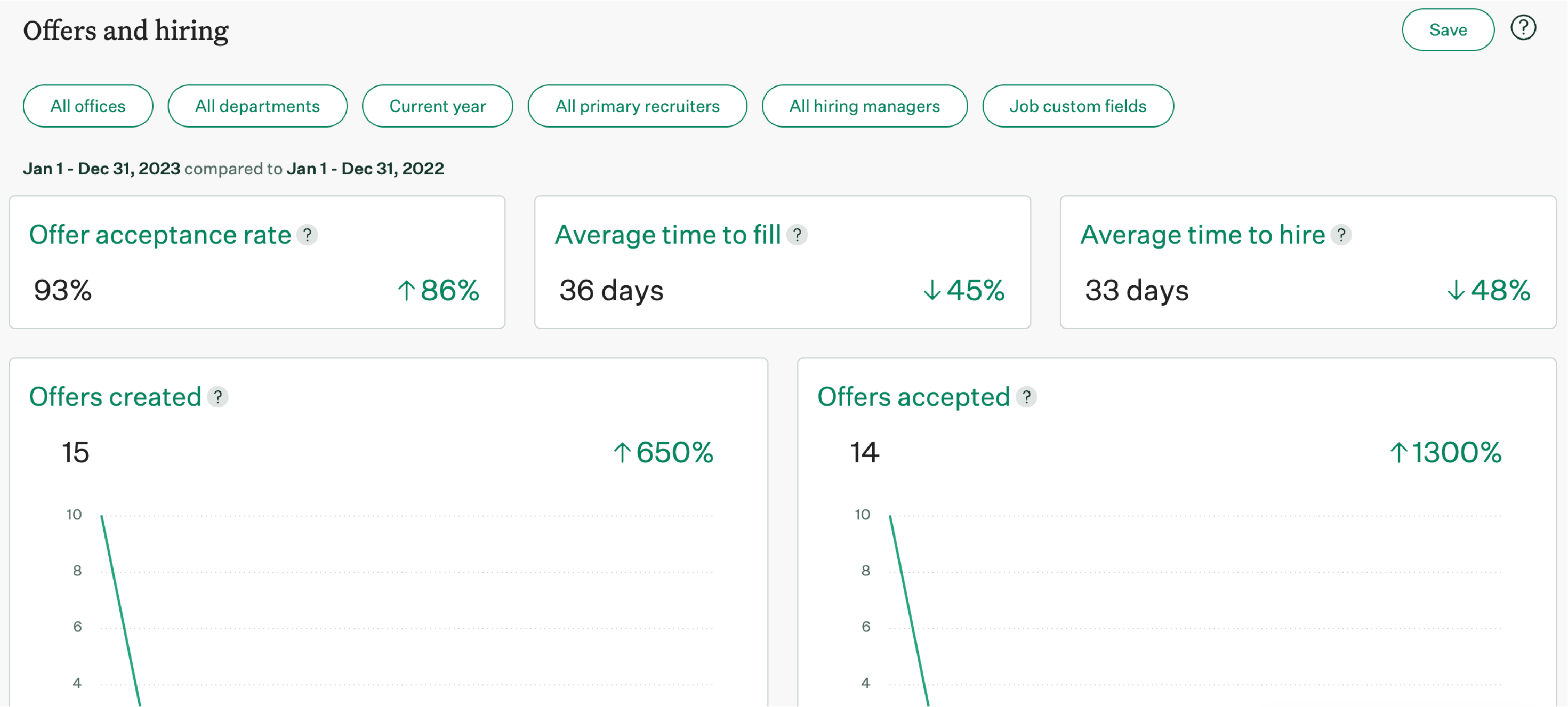
Pipeline and sourcing reports clearly show where candidates drop off and which channels lead to actual hires instead of just applications. I found the offer-acceptance analysis particularly useful for improving the closing process. DEI reporting, available on higher tiers, breaks down demographic data at every stage of the pipeline, not just at the final hire.
An Analytics Chart Agent, part of Greenhouse's newer AI features, converts a plain-text question into a chart without manual setup. This saves time on requests that used to require building a custom report from scratch.
The tradeoff becomes apparent at scale: performance can slow when generating large reports. A team without in-house reporting expertise may need Greenhouse's professional services to fully utilize the advanced options.
Onboarding
Once an offer is signed, Greenhouse Onboarding automates the new-hire task list, digital paperwork, and the transition from candidate to employee record. This way, a manager doesn’t have to recreate a checklist from memory for each new hire.
I found the connection to the original candidate profile to be a real time-saver, as offer details and interview history carry over instead of needing to be re-entered.
This module is offered as an add-on rather than included in the core ATS. Several sources describe it as functional but noticeably less developed than Greenhouse's recruiting tools. A company looking for comprehensive HR functionality after hiring should view this as a bridge to a dedicated HRIS, not a replacement for one.
Greenhouse Pricing Review: Is It Worth the Investment?
Greenhouse does not publish pricing on its site. Each quote is based on headcount and the modules a company chooses, across three tiers: Core, Plus, and Pro. To get an actual number, you need to book a call with sales.
Independent estimates suggest a range between $6,000 and over $70,000 per year, depending on company size and tier. Implementation fees are estimated separately, starting around $1,000 for a small deployment and going up to $15,000 or more for a complex, multi-department rollout.
Onboarding and CRM capabilities are sold as separate modules from the core recruiting platform. Therefore, a quote that only covers Recruiting will not reflect the total cost of a fully equipped account.
Treat every figure here as directional since Greenhouse has not confirmed pricing publicly. Request a quote that includes every module your team plans to use, along with implementation, before comparing the total against competitors like Lever or Ashby.
Greenhouse Marketplace
Greenhouse Marketplace connects with over 400 third-party tools, including HRIS platforms, background check providers, assessment tools, and job boards. This integration depth is often the main reason companies choose Greenhouse over simpler alternatives.
According to several accounts, connections to Workday, background check vendors, and coding assessment platforms can be set up in just an afternoon.
Greenhouse MCP, announced in May 2026 and now being rolled out to customers, connects approved AI tools like Claude, Gemini, or Copilot directly to Greenhouse. This allows teams to generate executive summaries or hiring health briefs while keeping sensitive candidate data secure within the system of record.
For companies already using a specific AI assistant internally, this represents a significantly different integration model compared to a typical point-to-point connector.
Greenhouse Security and Compliance
Greenhouse supports GDPR and CCPA compliance directly in the product, including candidate data consent management, access request handling, and configurable data retention rules. Role-based permissions control who can view sensitive candidate and hiring data across a large organization.
On the AI side specifically, Greenhouse earned ISO/IEC 42001 certification in 2026, a dedicated AI management system standard, and subjects Talent Matching to monthly third-party bias audits from Warden AI with results published on a public dashboard.
Candidates can request non-AI manual review in jurisdictions that require it, and job posts can carry a configurable AI-use disclaimer. Companies with sector-specific compliance needs beyond what is publicly documented should confirm specifics directly with Greenhouse's sales and legal teams.
Greenhouse Reviews: Pros & Cons
Based on my evaluation and cross-referencing verified user reviews, these are the standout strengths of Greenhouse:
- Structured Hiring That Actually Gets Enforced: Reviewers consistently credit mandatory scorecards and interview kits with removing gut-feel bias from hiring decisions. They emphasize that these tools are not just provided but are actively adopted.
- Integration Depth: Verified users report that they can connect Greenhouse to an existing HRIS, background check provider, and assessment tools in a single afternoon. They highlight the 400+ integration ecosystem as nearly unmatched in the category.
- Reporting Users Can Act On: Multiple reviewers specifically mention that pipeline bottleneck visibility and offer-acceptance analysis are significant upgrades after switching from a less structured ATS.
- Responsive Support: Verified reviewers describe live chat and account management as fast and consistently helpful, especially during the initial rollout.
- Consistent Product Investment: Users who have been with Greenhouse for years note steady, meaningful feature releases instead of a platform that stagnates after the initial sale.
Despite these strengths, the same users reported several cons of Greenhouse that you should be aware of:
- Steep Setup and Learning Curve: Users reported meaningful upfront configuration work, and admins specifically flag permission customization as more rigid than expected.
- Reporting Slows Down at Scale: Multiple reviewers note that performance degrades when pulling large or complex reports, particularly for organizations without dedicated reporting staff.
- AI Feature Pace Lags Newer Competitors: Several users specifically compare Greenhouse's AI rollout unfavorably to newer, AI-native ATS platforms, citing a more conservative release cadence.
- Talent Pool Search Feels Clunky: Users reported searching the existing candidate database as less intuitive than the rest of the platform, requiring more manual filter-building than expected.
- No Unified, Automatic Talent Rediscovery: Finding past candidates for a new opening means using two separate manual tools rather than one continuously updated, automatically scored search across the entire database.
How Integrating Skima AI Can Handle Greenhouse's Limitations
Real Talent screens new applicants, while Talent Matching sorts them into categories. Additionally, Greenhouse uses a categorical approach instead of giving specific scores. Talent rediscovery requires two separate manual tools.
In contrast, Skima AI offers an evidence-based score, continuous candidate rediscovery across the database, and a compliance check during job postings. These are features that Greenhouse lacks and are important for compliance with hiring laws. I noticed teams using Greenhouse often integrate Skima AI to address these gaps within Greenhouse.
Here is what the integration adds:
- Job Description Compliance Check: Before a requisition goes live, Skima AI flags gender or age-coded language, audits inflated requirements that could indirectly exclude protected groups, and confirms a compensation range is included where local law requires it, identifying potential compliance risks before applications arrive rather than analyzing outcomes after the fact.
- Organized AI Candidate Screening: As candidates apply for a job synced from Greenhouse, Skima AI screens and ranks each resume against the role's actual requirements with a specific score rather than a category label, so a recruiter sees precisely where a candidate is strong or falls short.
- Continuous, Unified Talent Rediscovery: Skima AI automatically scans a company's entire Greenhouse database, including prospects and past applicants, for candidates who fit a new opening, rather than requiring a recruiter to choose between two separate tools and rebuild filters each time.
- De-Duplication and Profile Enrichment: Where Greenhouse flags a possible duplicate based on shared email, phone, or LinkedIn URL, Skima AI goes further by merging those records and filling in missing profile fields from context, so the duplicate is resolved rather than left as an unaddressed tag.
- Explainable Match Scoring Behind Every Stage: Every score comes with match reasons tied to specific skills, years of experience, and certifications, giving a recruiter or hiring manager the itemized evidence behind a ranking rather than a category alone.
Who Is Greenhouse Best For?
Greenhouse is best for mid-market and enterprise firms that hire consistently and seek a robust hiring process. It's a strong match if your company has 100 to 10,000+ employees, requires DEI reporting, and prioritises an extensive integration ecosystem.
Additionally, it offers AI features that support recruiters without automating decisions, and it remains independent from larger HCM suites.
Who Should Avoid Greenhouse?
Greenhouse's structured approach suits serious hiring but may overwhelm simpler needs. Consider alternatives if you’re a small team hiring infrequently without the capacity to create scorecards.
Additionally, if you run a staffing agency needing CRM-focused sales management, seek self-serve pricing, or require a detailed numeric AI match score, Greenhouse might not be the right fit. Continuous automatic candidate rediscovery is also lacking.
Final Verdict: Should You Buy Greenhouse?
I'd recommend Greenhouse to mid-market and enterprise companies that want a thorough, auditable hiring process and are ready to invest the time needed for that structure. Also, its AI features like Real Talent and Voice AI show real restraint while other vendors push for full automation.
I would direct a team elsewhere if they need quick setup with minimal configuration, published pricing, or a detailed numeric match score instead of a categorical one.
For companies that want to add scoring depth and continuous candidate rediscovery to their existing Greenhouse setup right now, integrating Skima AI is the more practical option rather than waiting for Greenhouse's more cautious AI roadmap to catch up.
Frequently Asked Questions
1. What is Greenhouse?
Greenhouse is an enterprise applicant tracking system (ATS) that centralizes job postings, candidate pipelines, interview scheduling, feedback, and analytics to standardize hiring and improve collaboration across recruiting teams.
2. How much does Greenhouse cost?
Greenhouse pricing varies by company size, modules, and contract. It doesn’t publish fixed rates; expect annual costs starting in the low thousands for smaller teams and significantly higher for enterprise deployments.
3. Can Greenhouse integrate with other HR tools?
Yes, Greenhouse integrates with job boards, sourcing platforms, HRIS, background checks, calendar providers, and collaboration tools via native connectors and an open API, enabling centralized hiring workflows and data synchronization.
4. Is Greenhouse suitable for small startups?
Greenhouse suits growing teams that hire frequently. Small startups with infrequent hires or tight budgets may find it costly and feature-heavy; evaluate hiring volume, required features, and budget before committing.
5. Can Greenhouse integrate with Skima AI?
Greenhouse integrates with Skima AI using APIs or connectors to provide semantic resume search, AI shortlist recommendations, automated outreach, and better analytics. So, it speeds up screening and boosts candidate-match accuracy.


