





AI Calibration in Chrome Extension
Review knocked out candidates in the Chrome Extension
4 min read
- View AI Calibration knockout criteria inside the Chrome Extension to screen candidates faster within your ATS workflow.
- Apply must-have filters directly at the job level to instantly separate matched and disqualified candidates.
- Keep screening logic consistent between Skima AI App and Chrome Extension by using the same configured knockout criteria across both.
- Surface clear disqualification reasons for rejected candidates to improve screening transparency and recruiter confidence.
Review Knockout Filters Faster
Skima AI now brings AI Calibration into the Chrome Extension, allowing recruiters to review the knockout criteria already configured for a job and apply them directly while screening candidates. This makes it easier to evaluate fit inside the ATS without leaving the workflow, while still keeping all must-have logic defined in the Skima AI App.
Open and Apply Calibration
- Open Chrome and install the Skima AI Chrome Extension from the Chrome Web Store
- Open the extension and Log in with the Skima AI account linked to your ATS
- Pin the synced extension to your browser toolbar for quick access
- Open your Skima AI extension and go to a particular job
- Find the 'AI Calibration' button in the header
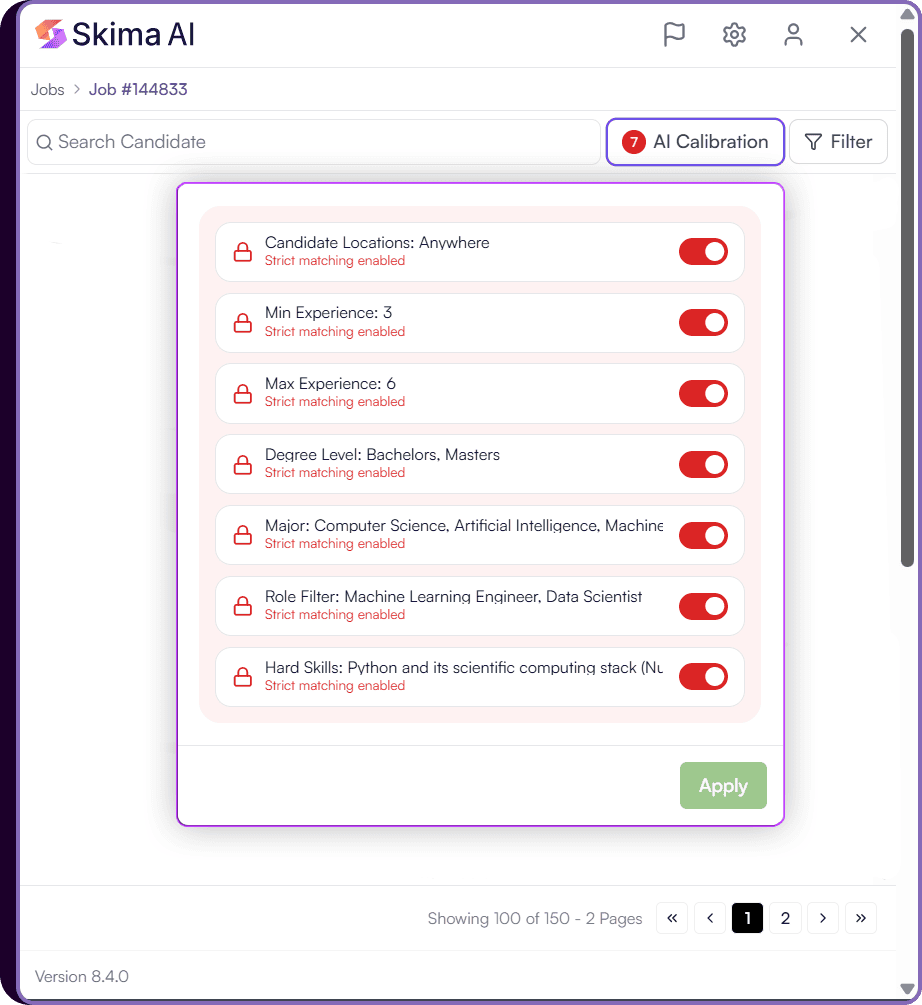
- Select the relevant Knockout Criteria from the list and Click 'Apply'
- Skima AI will 'Re-Calibrate' the candidates based on the 'must-have' criteria
- For knocked out candidates, you will see a 'Disqualified' tag with an explanation.
Note:
AI Calibration must first be set up inside the Skima AI app. Go to View JD → Edit Job Description → Edit the Summary → Add the Must Haves → Save and Regenerate.
In the Chrome Extension, recruiters can only review the knockout filters already configured in the app. If AI Calibration has not been set yet, configure it in the app first and then continue here.
Refer: Setting up AI Calibration
Use the Same Screening Logic
AI Calibration in the Chrome Extension reflects the knockout rules that were already configured for the job inside the Skima AI App. Recruiters can view those criteria inside the extension, select the relevant must-have filters, and apply them while reviewing candidates in the ATS.
If a candidate does not meet a mandatory requirement, Skima AI marks the profile as 'Disqualified' and shows the reason. These disqualified candidates will be pushed below the qualified candidates in the candidates list. This keeps screening decisions consistent across both platforms while helping recruiters move faster through jobs that need strict qualification checks.
Screen With More Confidence
This update makes it easier for recruiters to enforce must-have requirements without leaving their ATS workflow. Instead of checking candidates one by one for basic fit, teams can apply calibration logic already defined in Skima AI and immediately see which candidates qualify.
For high-volume hiring, this means faster first-pass screening, cleaner shortlists, and stronger consistency in how recruiters apply knockout criteria across every role.