

















AI Calibration: Smart Location Filtering
Set radius-based candidate knockouts.
5 min read
- Create radius-based knockout filters directly from job description requirements.
- Automatically disqualify candidates outside the defined distance range during screening.
- Use geographic intelligence instead of keyword matching for more accurate location filtering.
- Reduce manual review time by enforcing strict location requirements before shortlisting.
Filter by Distance
Skima AI now creates knockout filters for location radius requirements inside AI Calibration. Recruiters can define how close a candidate must be to a job location, and Skima AI will generate a strict location-based filter that automatically screens out mismatched profiles. This helps teams enforce location rules more accurately while keeping the hiring workflow inside the ATS.
Set Location Knockouts
- Open any job in the 'Jobs' page
- Click the 'View JD' tab in the header
- Click 'Edit Job Description' → 'Pencil Icon' to edit
- Add your location requirement inside 'Add Additional Job Description' or directly inside the Main JD Section. Example: "Candidate must be inside 50km from New York City"
Note:
For teams using Skima AI as an ATS:
Add the location criteria inside the main JD section if you want candidates to view this requirement in the job posting.
For teams using Skima AI as an Intelligence Layer:
You can add the criteria anywhere inside the JD for internal AI Calibration purposes. This will not modify or affect your external ATS job posting.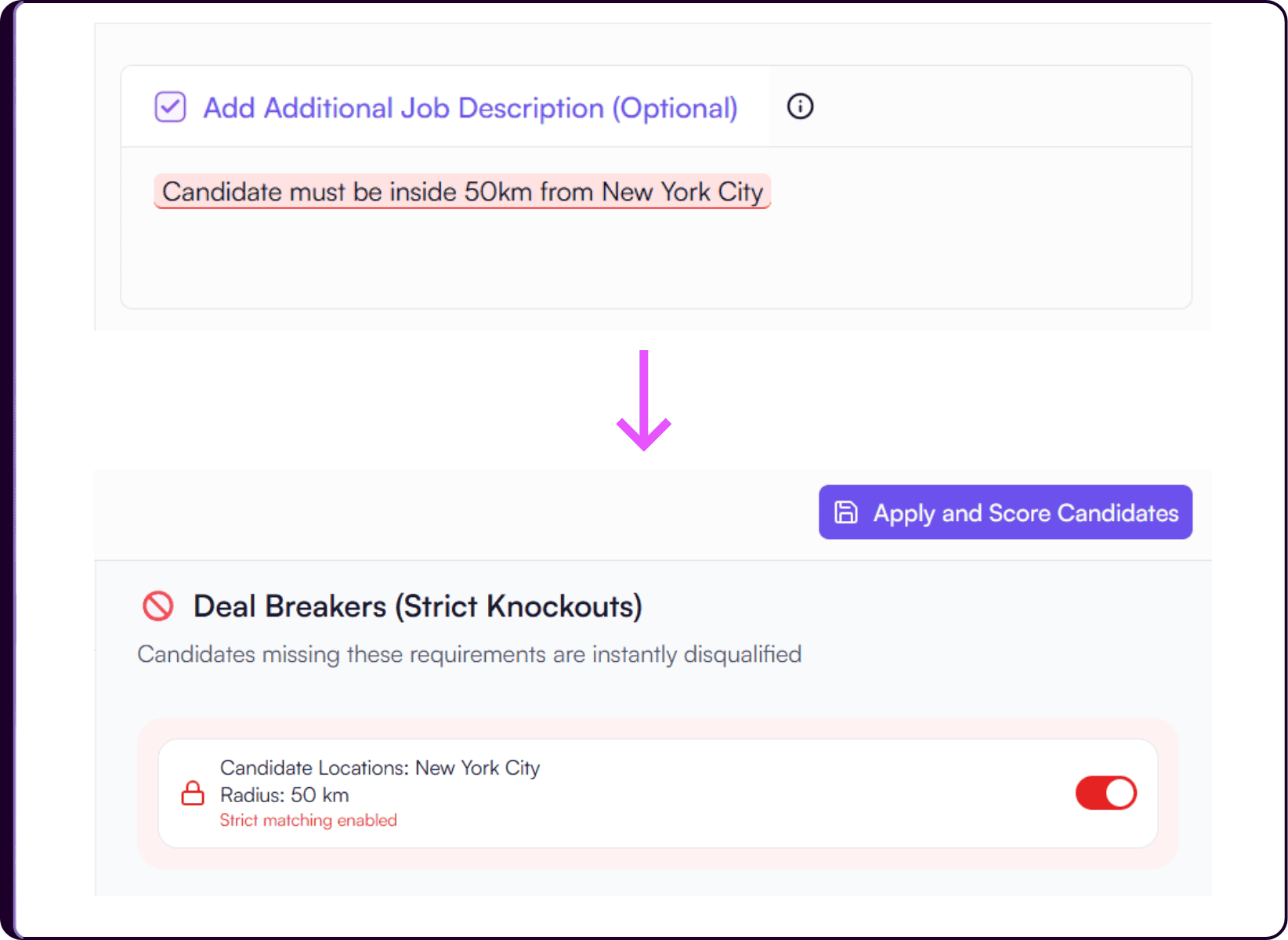
- Click 'Save and Regenerate' to create the location knockout filter
- Click 'Apply and Score Candidates' to enforce the filter
- Return to the 'View Candidates' list
- Candidates outside the defined radius will appear with a 'Disqualified' tag and explanation
Match Candidates by Geographic Radius
Skima AI reads the location requirement from the job description and converts it into a radius-based knockout filter. For example, if the JD mentions that candidates must be within 50 km of New York City, Skima AI creates a strict geographic matching rule and screens candidates accordingly.
This is not keyword-based filtering. Skima AI uses publicly available geographic intelligence, official coordinates, and mapped location data to identify whether candidates fall inside or outside the defined radius. Commonly known location references like NYC are understood correctly.
However, recruiters should avoid ambiguous abbreviations or location names that may overlap with places in other cities, states, or countries. If you want to search on the basis of the postal codes, kindly type in the postal code as well as the city or country to better define it. For example; 10001, New York City
Using clear and officially recognized location references helps Skima AI apply the radius filter more accurately and prevents unintended candidate matches.
Improve Location Accuracy
This update helps recruiters enforce location requirements much earlier in the hiring workflow. Instead of manually verifying candidate proximity during screening, teams can let Skima AI automatically apply strict geographic rules before shortlisting begins.
For hybrid, on-site, and region-sensitive hiring, this means cleaner shortlists, fewer location mismatches, and faster screening decisions across high-volume hiring workflows.