
















Chrome Extension: Advanced Job Filters
Find and select the right job faster inside the Chrome Extension with advanced job filters
3 min read
- Filter jobs inside the Skima AI Chrome Extension by status, location, recruiter, client, ATS status, and more to find the right job faster.
- Use job filters in the Upload Resume tab to select the exact job you want to link downloaded resumes to before uploading.
- Filter by recruiter name to instantly view only the jobs assigned to you, keeping the list focused during active sourcing.
- Avoid confusion when multiple jobs share the same name by narrowing down the list using advanced filter criteria.
Find the Right Job Faster
Skima AI has added an advanced job filter inside the Skima AI Chrome Extension, available across both the Jobs tab and the Upload Resume tab. When working with a large list of open roles, especially ones with similar names, recruiters can now filter by job status, ATS status, location, client, recruiter, date range, and custom fields to quickly locate the exact job they need.
Apply Job Filters
Open the Skima AI Chrome Extension
Go to the 'Jobs' tab or the 'Upload Resume tab'
Click on the Filter button on the top right
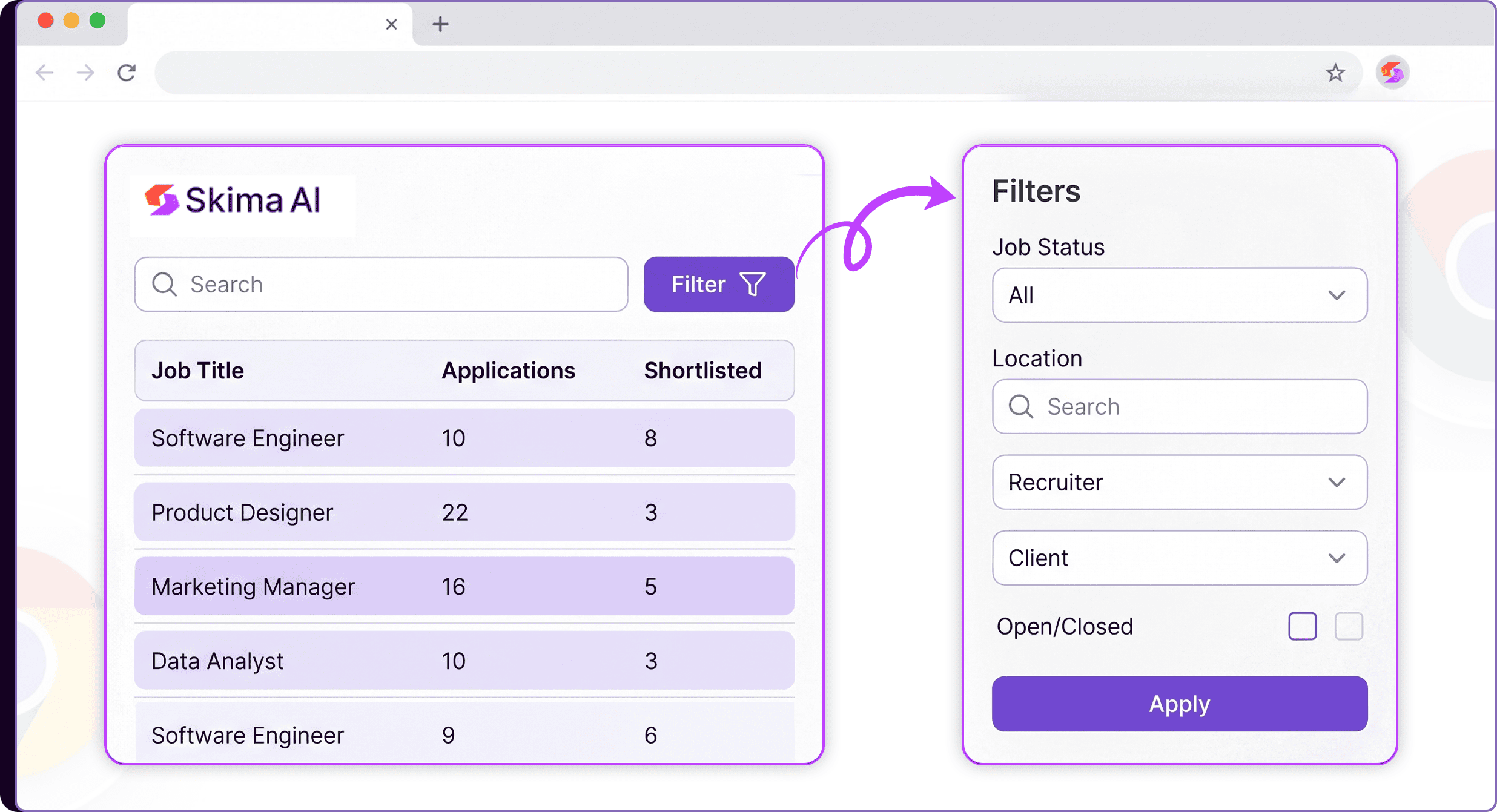
Apply filters across Source ID, Job Status, ATS Status, Location, Created At, Client, Recruiter, Deleted, Open/Closed, and Custom Fields
Click on 'Apply' to narrow the job list to matching results
Select the job you want to work on or link resumes to
Go to the Filters again and click on 'Clear Filters' to remove all filters
Filter Across Both Tabs
The job filter works the same way in both the Jobs tab and the Upload Resume tab. In the Jobs tab, it helps recruiters quickly surface the right role when the job list is long or contains jobs with similar names. Recruiters can also filter by their own name under the Recruiter filter to see only the jobs assigned to them, which is especially useful in agency setups or teams where multiple recruiters share the same ATS and job list.
In the Upload Resume tab, the same filters ensure resumes are linked to the correct job before uploading, reducing the risk of candidates being processed against the wrong role.
Less Scrolling, More Precision
This update removes the friction of manually scanning long job lists inside the extension. Recruiters can now jump directly to the right job using the criteria that matter, whether that is the client name, recruiter owner, job status, or location. For teams managing multiple open roles across clients and ATS sources, this means faster job selection, fewer upload errors, and a cleaner workflow from sourcing to candidate processing inside Skima AI.