
















Chrome Extension Preferences
Customize extension shortcuts, pages, and website support
4 min read
- Control how the Skima AI Chrome Extension opens inside your ATS with flexible drawer behavior settings.
- Manage which ATS pages are supported so the extension appears only where recruiters need it.
- Add new ATS websites directly from Preferences to expand extension support across recruiting tools.
- Adapt the browser experience to your workflow without changing the way your team already hires.
Customize Extension Control
Recruiters can now access Preferences inside the Skima AI Chrome Extension to control how it behaves across their ATS workflow. This gives teams direct control over sidebar access, supported pages, and where the extension should appear, making the extension adapt to how recruiters already work instead of forcing a fixed setup.
Access Extension Preferences
1. Open Chrome and install the Skima AI extension from the Chrome Web Store
2. Open the extension
3. Log in with the Skima AI account linked to your ATS
4. The synced chrome extension is then accessible from the extensions. Pin it to the top.
5. Open your Skima AI extension
6. Go to 'settings'
6. Your 'Preferences' appear. Select your Skima AI extension's behaviour.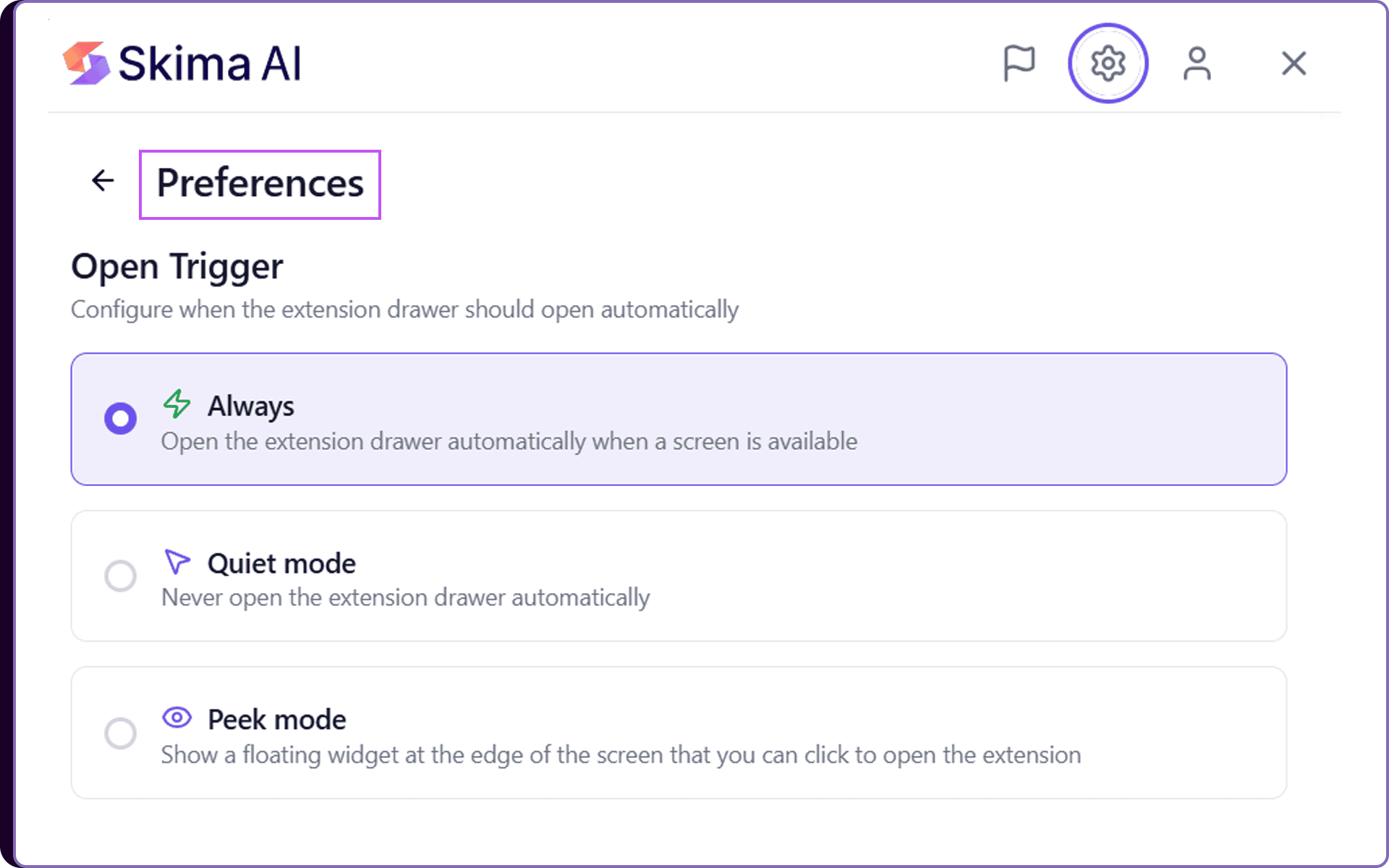
Control Where It Appears
Inside Preferences, recruiters can configure four core settings that make the Skima AI extension fit their daily workflow:
Open Trigger lets recruiters control when the extension drawer opens automatically inside the ATS.
Sidebar Shortcut allows teams to set a keyboard shortcut for instantly opening the extension without extra clicks.
ATS Sites section allows teams to manage supported ATS pages and request additional page support when needed.
Pages lets recruiters enable or disable the extension on specific ATS pages depending on where they want support.
Add Website allows new supported recruiting platforms to be added so the sidebar appears where hiring work actually happens
Reduce Workflow Friction
This update gives recruiters more control over how Skima AI fits into their existing ATS workflow. Instead of adjusting to a fixed tool experience, teams can shape the extension around their own hiring habits and platform usage.
The result is quicker access, fewer unnecessary interactions, and a cleaner experience across ATS pages, helping recruiters stay focused on candidate evaluation instead of tool navigation.
For a detailed setup guide and advanced configurations, refer to the Chrome Extension documentation in the Skima AI Docs.