

















Client's Page for Recruitment Agencies
Manage clients, contacts, and hiring activity centrally.
5 min read
- Manage multiple client accounts from one workspace built specifically for recruitment agencies.
- Link jobs directly to clients during job creation for cleaner account-level hiring visibility.
- Store hiring stakeholders and communication contacts centrally inside each client profile.
- Use filters, search, and active job visibility to manage agency operations faster at scale.
Centralize Recruitment Agency Hiring
Skima AI now includes a dedicated Clients workspace designed specifically for 'recruitment agencies' managing hiring across multiple client accounts. Agencies can create clients, link jobs, manage stakeholder contacts, and track hiring activity from one centralized view instead of maintaining separate spreadsheets or disconnected workflows.
This helps recruitment teams organize account-level hiring operations more efficiently while keeping client communication, recruiter ownership, and open job visibility structured inside the same workflow.
Create Clients While Building Jobs
- Go to 'Jobs' and click on 'Create Job'
- At the top, choose 'Select Client' to attach the job to an existing client, or 'Create New Client' to create a new client during job creation
- Enter the required client details and continue with the job setup
Once the job is created, it will automatically be linked to the selected client
The newly created client will also appear inside the 'Clients' pageNote:
Selecting or creating the client during job setup ensures all jobs and hiring activity are accurately tracked under the correct client account.
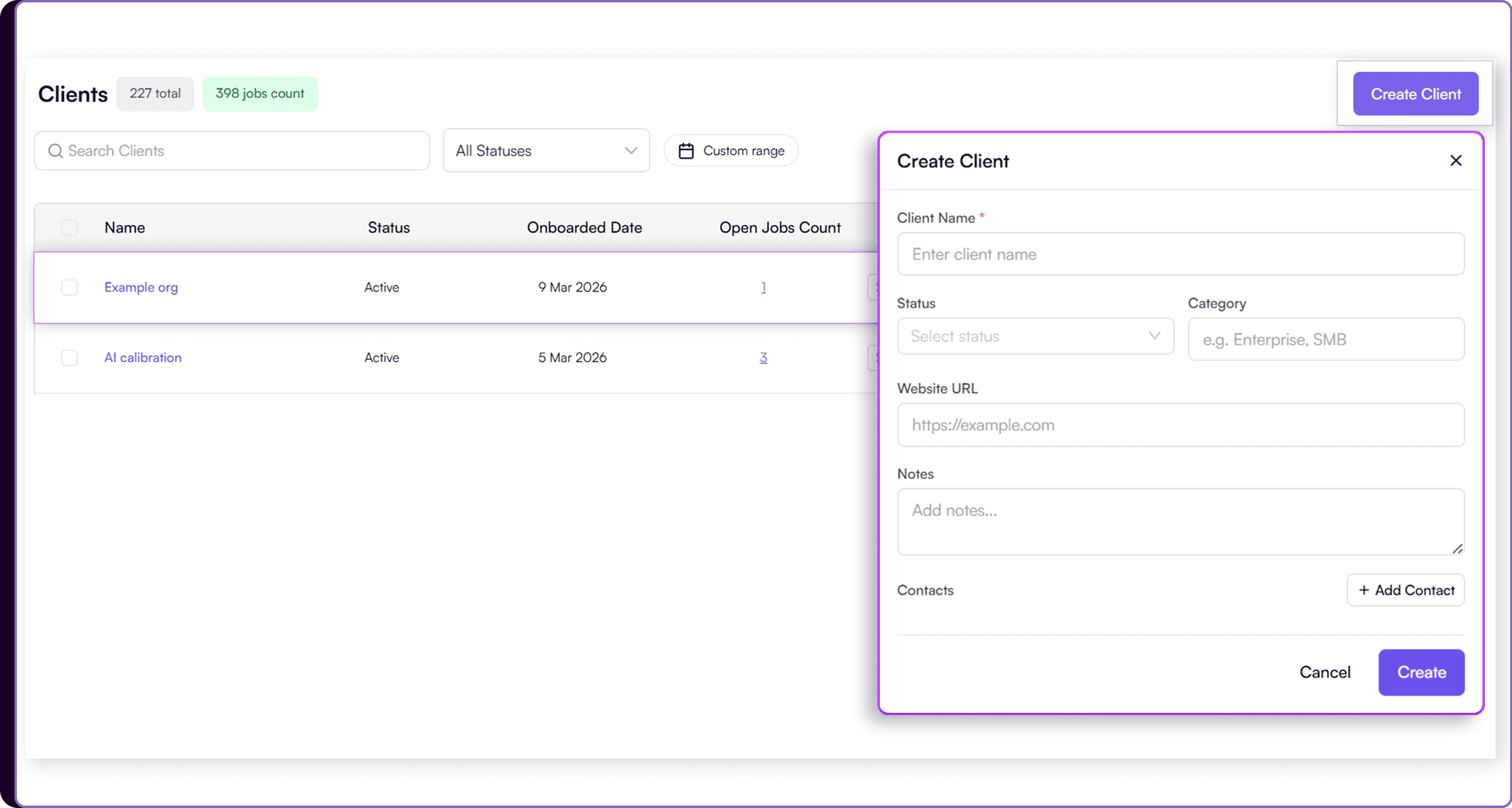
Create a New Client
- Go to 'Clients' page
- Review all client accounts along with total clients and active jobs count at the top
- Use the search bar, status filter, and onboarding date filter to quickly organize and locate client accounts
- Click on 'Create Client' on the top right
- Enter the client details including client name, status, category, website URL, and internal notes
- Under the 'Contacts' section, click on 'Add Contact' to add hiring stakeholders or client-side points of contact
- Enter the contact’s name, email address, designation, and mobile number
- Use the 'Include for communication' toggle to decide whether the contact should receive recruitment updates from Skima AI
- Click 'Create' to create a new client
Organize Hiring by Client
The Clients workspace acts as a centralized layer for recruitment agencies managing multiple external hiring accounts. Recruiters can create dedicated client profiles, attach jobs to those clients, and maintain structured hiring contacts within the same workflow.
Every linked job automatically becomes associated with its client account, making it easier to track hiring activity, recruiter ownership, active requirements, and account-level progress from one place. Search, filters, onboarding dates, and status controls help agencies manage growing client operations more efficiently.
Scale Agency Hiring Operations
This update helps recruitment agencies move away from fragmented spreadsheets and disconnected client tracking processes. Instead of manually organizing hiring activity across multiple systems, teams can now manage clients, jobs, and hiring stakeholders directly inside Skima AI.
For growing agencies, this means better operational visibility, faster account management, cleaner communication workflows, and a more scalable way to manage multi-client hiring operations.