

















Multi-Reviewer Hiring Manager Approval
Send candidate approval requests to multiple hiring managers at once and track every reviewer's decision from a single request.
5 min read
- Send candidate approval requests to multiple hiring managers or stakeholders at once, each receiving their own private review link.
- Configure automatic status actions for every possible outcome once all reviewers have responded, including when the group disagrees.
- Candidates stay in Pending until every reviewer has responded. Disagreements are automatically flagged as Conflict.
- Track every approval request from the Inbox with per-reviewer resend links, individual approver responses, and a running outcome summary.
Built for Group Decisions
Candidate Approval now supports multiple reviewers in a single request. Each reviewer gets their own private link and reviews independently, without seeing what anyone else decided. Once everyone has responded, Skima AI determines the outcome automatically based on how reviewers voted and applies the status action configured for that result.
Recruiters can also CC or BCC additional people when sending by email, looping them into the communication without giving them a review link.
Send to Multiple Reviewers
- Select candidates and click 'Send for Approval' from View Candidates or View Kanban as usual
- Add multiple recipients in Recipient (Email Addresses). Each person receives their own private link
- Configure the three outcome rules: If all reviewers approve, If all reviewers reject, and If reviewers give different answers
- Set expiry and visibility controls, then click Generate Link or Generate Link and Send Email
Note: CC and BCC fields are available in the Generate Link and Send Email flow only. They loop additional people into the email without giving them a review link.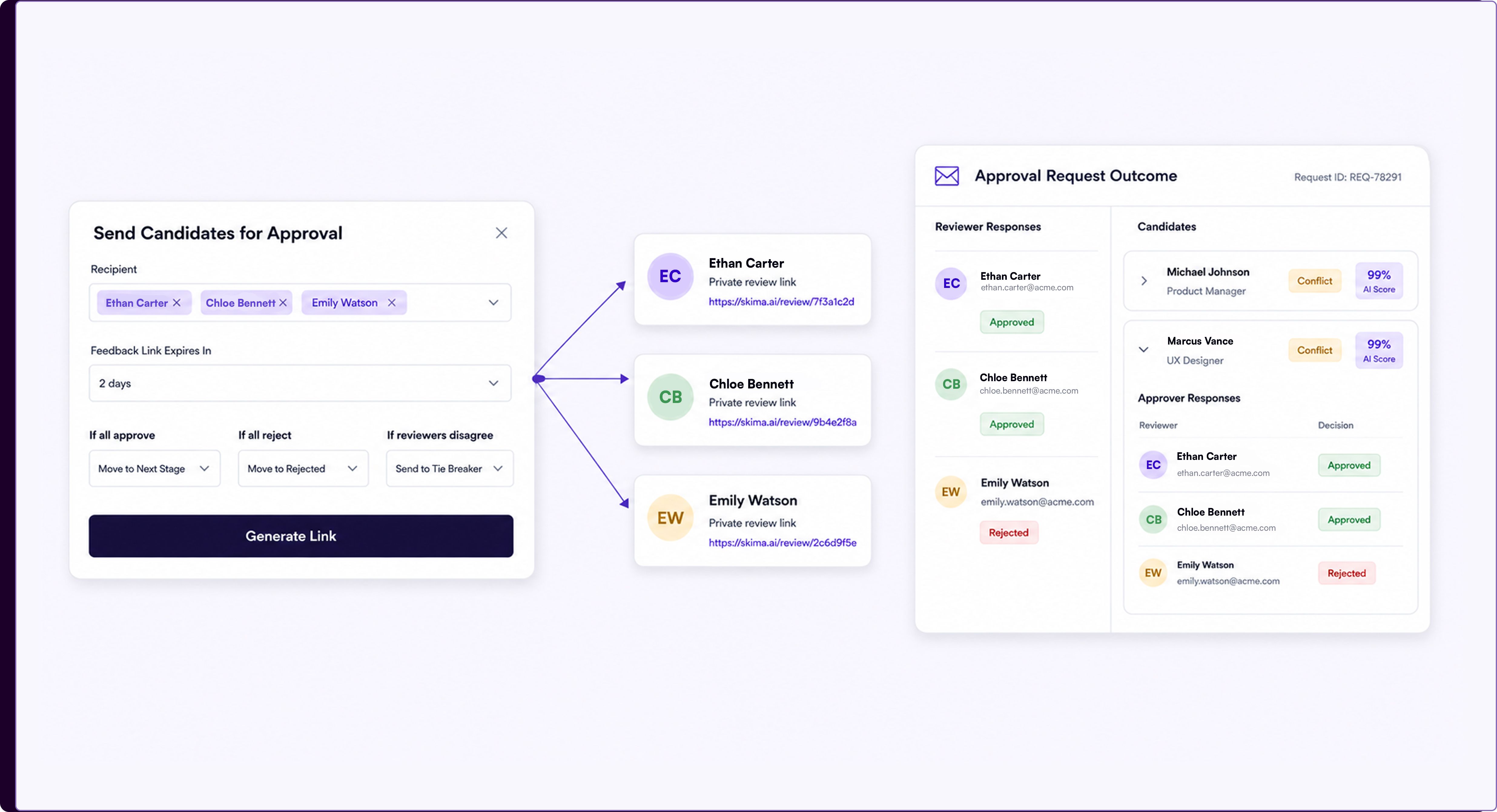
Track Responses From Inbox
- Go to Inbox from the left sidebar and open any candidate approval entry
- The left panel lists every reviewer with a Send Candidate for Approval resend link per reviewer
- Click View Links to open the Approver Links modal, which shows each reviewer's name, email, and their individual review link with a copy option
- The right panel shows every candidate with their outcome tag: Approved, Rejected, Conflict, or Pending. Expand any candidate to see each reviewer's individual decision under Approver Responses
- A summary at the bottom shows total counts across Selected, Rejected, Conflict, Pending, and Total
Consensus Before Action
A candidate's outcome is only finalized once every reviewer has responded. Until then the candidate shows as Pending. If reviewers disagree, the candidate is marked Conflict and the status configured for that outcome is applied. If no action was configured for the result that occurred, the decision still shows but with a note that no action was taken rather than an automatic status change.
Note: This update applies to Candidate Approval only. Job Approval from the Jobs list is unchanged and still supports a single recipient.
Every Stakeholder, One Request
Hiring decisions rarely come from one person. Multi-reviewer approval brings the full decision-making group into a single structured request, with automatic conflict detection and a complete outcome trail, without any extra coordination from the recruiter's side.