












Screening Questions Filter
Shortlist faster using screening answers
4 min read
- Use screening question responses as instant candidate filters inside both View Candidates and Kanban to reduce manual profile checks.
- Shortlist faster using must-have criteria like location, certifications, notice period, experience thresholds, and custom knockout responses.
- Keep first-pass screening inside your ATS workflow by turning screening answers into direct shortlist controls without switching views.
- Improve pipeline cleanliness for high-volume roles by surfacing only qualified applicants before recruiters begin manual evaluation.
Turn Screening Answers into Instant Filters
Skima now allows recruiters to filter candidates in both View Candidates and Kanban using their screening question responses. This makes it much easier to instantly narrow applicants based on must-have criteria like location, experience, certifications, notice period, or any custom knockout questions. The filters automatically appear for published jobs where candidates have submitted responses, bringing qualification checks directly into the shortlist workflow.
In App -
1. Go to https://app.skima.ai/jobs
2. Select any job
3. Open Filters and click 'Show more filters'
(Screening question filters appear only if the job is published and candidates have submitted answers.)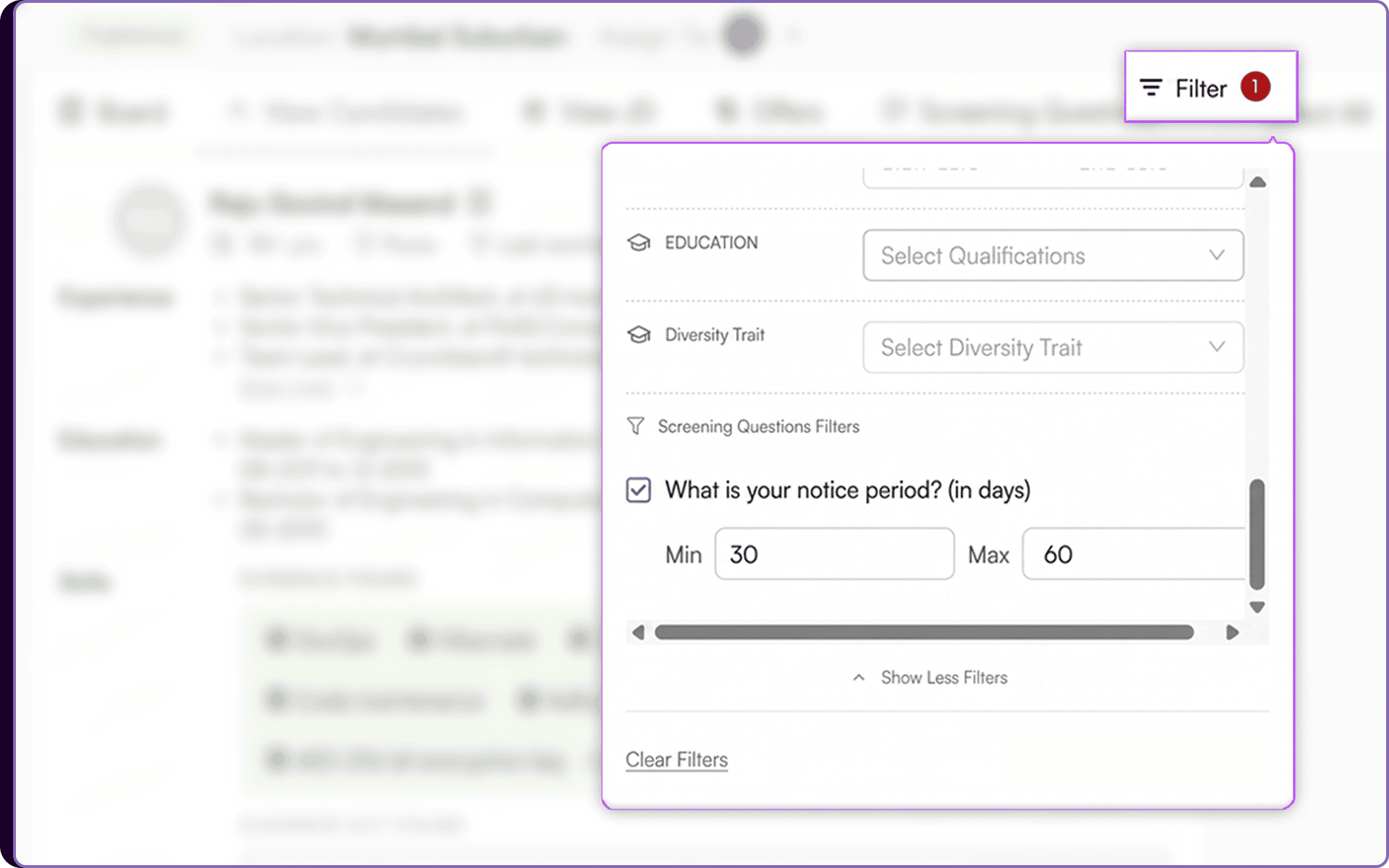 4. If no screening questions were added while creating the job, the section will show ‘No Screening Questions’.
In Chrome Extension -
1. Go to a Job
2. Click on ‘Filter’ on the top right
3. Navigate to 'Screening Questions Filter'
(Screening question filters appear only if the job is published and candidates have submitted answers)
4. Select the screening questions you wish to filter the candidates by
5. Click on 'Apply'.
Filter by Must Have Responses in Seconds
Once enabled, recruiters can use candidate responses as instant shortlist controls. Instead of opening profiles one by one to verify answers, they can directly select required responses from the filter panel and reduce the visible list to only matching applicants. This works seamlessly across both the candidate list and Kanban, making it easy to move from screening to stage management without losing context.
Whether the team is hiring for location specific roles, mandatory certifications, or experience thresholds, this feature turns application answers into an immediate decision layer that speeds up first-pass screening.
Faster First Pass Shortlisting
This update dramatically cuts the manual effort involved in early shortlisting. Recruiters no longer need to repeatedly scan individual profiles just to verify basic must-have responses. Instead, they can surface qualified candidates in seconds and focus their time on meaningful evaluation. For high-volume roles, this means faster shortlist creation, cleaner Kanban workflows, and fewer chances of strong candidates getting buried in the pipeline. It’s a simple upgrade that makes the first stage of hiring feel significantly faster and more controlled.