














Send Candidates for Approval: Chrome Extension
Generate hiring manager approval links directly from the Chrome Extension without switching to the Skima AI app.
4 min read
- Generate a hiring manager approval link directly from the Chrome Extension without switching to the Skima AI app.
- Control what reviewers see by hiding AI scores or candidate cons before sharing the approval link.
- Set custom expiry on feedback links and define what status applies when a candidate is selected or rejected.
- Collect stakeholder feedback on shortlisted candidates without breaking your ATS workflow.
Approvals Without Leaving Your ATS
Recruiters can now send candidates for hiring manager approval directly from the Chrome Extension. Previously this required switching to the Skima AI app to generate an approval link. Now the entire flow, from selecting candidates to generating and sharing the link, happens inside the extension while you are already working in your ATS.
Generate an Approval Link
- Open the Skima AI Chrome Extension inside your ATS
- Go to a job and open the candidate list
- Select one or more candidates using the checkboxes in the candidate list
- Click "Send for Approval" in the bulk action bar at the bottom of the panel
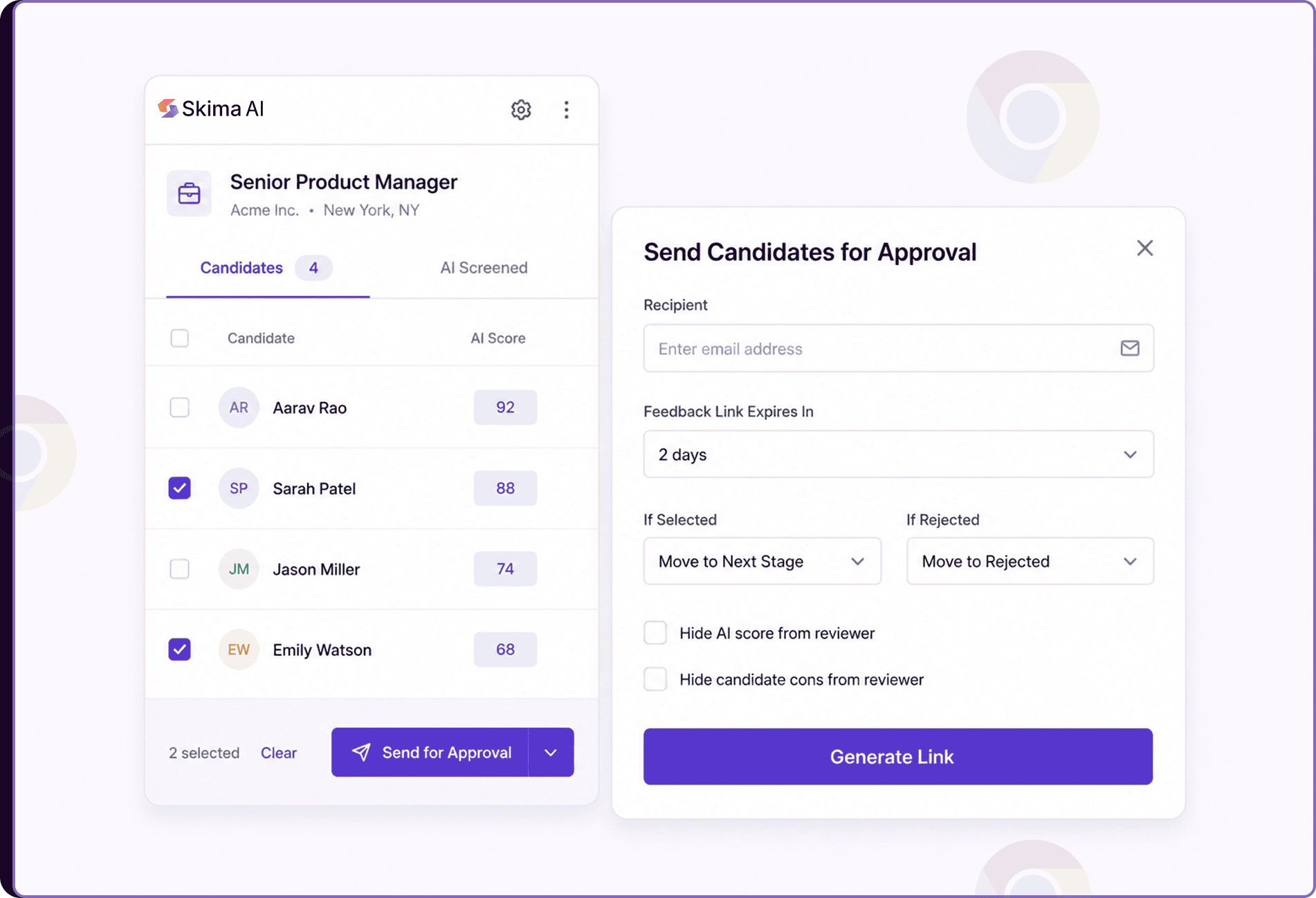
- In the "Send Candidates for Approval modal", enter the Recipient email address of the hiring manager or stakeholder
- Set how long the "Feedback Link Expires In". It defaults to 2 days
- Use the "If Selected" and "If Rejected" dropdowns to define what candidate status should be applied based on the reviewer's decision
- Optionally check "Hide Candidate's AI score from the reviewer"or "Hide Candidate's cons from the reviewer" to control what the hiring manager sees
- Click on "Generate Link"
- Copy the generated approval link from the confirmation screen and share it directly with the hiring manager
No Tab Switching Required
The approval flow in the Skima AI Chrome Extension mirrors what is available in the Skima AI app. Once the link is generated, the hiring manager receives it and can review the shortlisted candidates, leave feedback, and make selection or rejection decisions from their end. Status updates defined in the modal are applied automatically based on their response.
The visibility controls let recruiters decide how much context to share with reviewers. Hiding AI scores or cons keeps the review focused on the candidate's profile without surfacing evaluation details that are meant for the internal team.
Faster Feedback, Less Friction
Switching between the Chrome Extension and the Skima AI app to complete a single workflow breaks focus and slows down active sourcing sessions. With approval link generation now available directly in the extension, recruiters can shortlist candidates, send them for review, and continue working in the ATS without losing momentum.
For teams that rely on hiring manager sign-off before moving candidates forward, this means faster feedback cycles and a more connected workflow from sourcing to stakeholder review.