



















AI Screening and Recruiting Automation for Paycom
Skima AI integrates with Paycom to screen resumes, rank candidates, rediscover past applicants, detect bot applicants and resume fraud, and conduct AI video interviews. No data migration required.




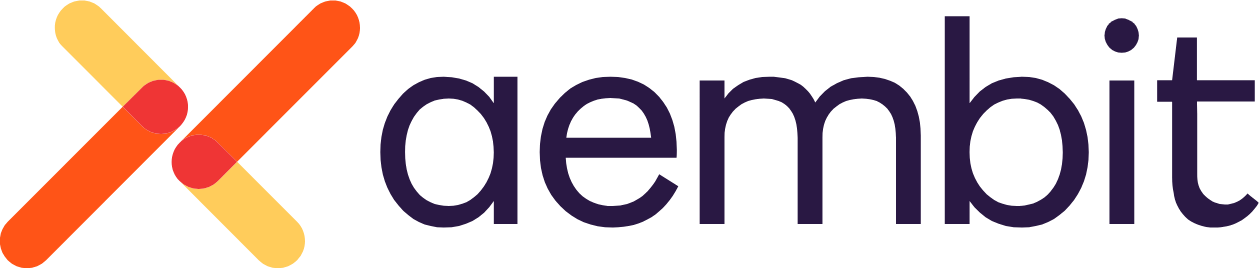
Five AI recruiting tools in one Paycom integration
Connect once through the Paycom REST API with your API SID and Token. Every AI capability below reads from Paycom and writes results back to the candidate profile without migrating HCM data.
Talent rediscovery
Skima AI uses semantic candidate matching and surfaces past applicants from your Paycom candidate database when a new requisition opens. Explainable scores and shortlists write back to the candidate profiles inside Paycom.
Rediscovery →Candidate fraud detection
Skima AI detects bot applicants, templated and AI-generated resumes, and resume discrepancies before the Paycom interview step. Fraud risk scores and anomaly signals write back to the candidate profile.
Fraud Detection →AI video interviewer
Automated AI interviews that launch the moment a candidate applies or reaches a hiring workflow step you define. Summary, transcript, and scores write back to the candidate profile.
AI Interviewer →Explainable AI matching
Skima AI provides evidence behind every match score: which skills aligned, which experience transferred, which criteria the candidate met or missed. Explainable AI your team can audit.
Explainable Matching →AI resume screening
Automated resume screening that batch processes every incoming application in Paycom, ranks and sorts candidates by fit, and highlights top candidates. Built for high volume hiring without manual review time.
AI Screening →Why Paycom teams choose Skima AI integrations
Skima AI is built for Paycom's hiring workflow. Every screening score, match explanation, and fraud rating writes back to the candidate profile.
Automated AI recruiting inside Paycom
Paycom manages your workforce. Skima AI adds automated resume screening, AI candidate ranking, candidate fraud detection, and rediscovery to its Applicant Tracking module.
Reduces manual resume review time
Skima AI automatically screens and shortlists incoming applications in Paycom. Recruiters review ranked candidates, not raw stacks. Manual resume review time is cut in half.
Blocks bot applicants before interviews
Skima AI detects bot applicants, AI-generated resumes, and resume discrepancies before they reach your interview step. Fraud risk writes back to the candidate profile.
Explainable AI for every hiring decision
Every match score includes the evidence behind it: which skills aligned, which experience transferred. Explainable AI your team can audit and act on.
Reduces time-to-Hire across every role
Automated screening and AI candidate matching reduce recruiter review time at every hiring workflow step. Teams move from application to interview faster.
Surfaces candidates already in your HCM
Skima AI scans your full Paycom candidate database, including Candidate Tracker records, and surfaces past applicants who match current open requisitions.
How to set up Paycom AI integration
Skima AI integrates natively with Paycom without migrating HCM data. It writes screening scores, fraud ratings, and match explanations to the candidate profile in real time.
Connect Paycom
Register for Paycom REST API access through your Paycom representative. Authenticate with your API SID and Token over HTTP Basic Auth. Indexing of your candidate database begins immediately.
Skima AI works in the background
Every new application triggers automated resume screening. Your existing candidate database gets indexed for rediscovery. Fraud signals are evaluated. Nothing changes in how your team uses Paycom.
Results appear inside Paycom
Skima AI writes screening scores, match explanations, fraud risk ratings, and interview summaries back to the candidate profile as structured data.
AI layer inside Paycom. No separate login.
Skima AI works inside Paycom without requiring a separate login or manual data entry. Screening scores appear on the candidate profile. Fraud detection appears alongside application details. Interview summaries and match explanations appear as structured notes.
- Results written to the Paycom candidate profile, not an external dashboard
- No additional Paycom seat or license required
- Existing Paycom permissions apply to all Skima AI outputs
- Recruiting data flows into Paycom's HR and onboarding modules through its single database

Enterprise-grade responsible AI for Paycom integrations
NYC Local Law 144
Bias audit completed and published. All Automated Employment Decision Tool requirements met for automated hiring decisions.
EU AI Act
High-risk AI transparency, explainability, and human oversight requirements met. Applies to candidate matching, screening, and JD optimization.
Bias Auditing
Adverse impact analysis covers every AI decision. Candidate matching, JD optimization, interview question generation, and candidate scoring.
Data Ownership
Your candidate data is never used to train models for other customers. Full data isolation between accounts. Your database stays your competitive advantage.
SOC 2 Type II Certified
Candidate data encrypted at rest and in transit. Infrastructure audited and certified to SOC 2 Type II standards.
Human in the Loop
AI recommends, your recruiter decides. Skima AI never auto-rejects a candidate and never auto-advances anyone to an offer.
Ready to automate screening in Paycom?
Frequently asked questions
Everything you need to know about the Paycom integration
Does Paycom use AI to screen resumes?
Paycom offers IWant, its native AI engine, but it does not screen resumes or rank candidates by fit. Skima AI adds automated resume screening that batch processes every incoming application in Paycom, ranks candidates by fit, and writes shortlists back to the candidate profile inside Paycom's Applicant Tracking module.
Can we use AI to screen resumes or rank candidates in Paycom?
Yes, Skima AI connects to Paycom through the Paycom REST API and screens resumes against your job criteria automatically. Candidates are ranked and sorted by fit. Shortlists and screening scores write back to the candidate profile inside Paycom without migrating HCM data.
Does Skima AI work inside Paycom without requiring a separate login?
Yes, Skima AI integrates natively with Paycom through the Paycom REST API. Screening scores, match explanations, fraud risk ratings, and interview summaries all write back to the candidate profile inside Paycom. Recruiters never leave the HCM or log into a separate platform. No second tool to learn.
Does Skima AI detect bot applicants in Paycom?
Yes, Skima AI detects bot applicants, AI-generated resumes, proxy applicants, and resume discrepancies before they reach your interview step. Detection results write back to the Paycom candidate profile as fraud risk ratings. Recruiters review the flag and decide how to proceed. Skima AI never auto-rejects.
How does Skima AI connect to Paycom?
Through the Paycom REST API, authenticated with an API SID and Token issued by your Paycom representative. Register for access, receive your credentials, and the connection is live. Your recruiting data stays inside Paycom. No IT project or data migration required.
Does Skima AI help rediscover candidates already in my Paycom database?
Yes, Skima AI scans your Paycom candidate database, including archived applicants and candidates who didn't advance in previous requisitions. When a new requisition opens, Skima AI uses semantic matching to rediscover past applicants who fit, ranked with explainable scores. Results are written back to the candidate profile inside Paycom before your team sources externally.
Does Skima AI run automated AI interviews inside Paycom?
Yes, Skima AI runs AI video interviews the moment a candidate applies or reaches a hiring workflow step you define. A structured summary, transcript, and scores against your job criteria write back to the candidate profile. Recruiters review pre-screened candidates inside Paycom without scheduling manual phone screens.
Which AI screening solutions offer explainable AI for hiring decisions?
Skima AI offers explainable AI matching for Paycom. Every match score includes the reasoning: which skills aligned, which experience transferred, which criteria the candidate met or missed. This differs from black-box scoring tools that return a number without evidence. Explainable AI for hiring decisions means your team can audit every recommendation before acting on it.
What hiring tools identify resume discrepancies before background checks?
Skima AI detects resume discrepancies at the application stage, before background checks run. This includes inconsistencies between claimed employment history, qualifications, and verifiable signals. Fraud risk scores are written back to the Paycom candidate profile so recruiters can investigate or reject before the candidate reaches an interview or offer stage.
Is Paycom candidate data secure with Skima AI?
Skima AI reads from your Paycom instance via the Paycom REST API. Candidate data stays in Paycom. Skima AI does not copy it to a separate database, does not use it to train AI models, and does not require data migration. The connection is SOC 2 Type II certified, GDPR compliant, and encrypted at rest and in transit.
Does Skima AI connect recruiting data to Paycom's HR and onboarding modules?
Yes. Skima AI writes screening results, match scores, and fraud ratings to the candidate profile in Paycom's Applicant Tracking module. Because Paycom runs on a single database, candidate data enriched by Skima AI flows into onboarding and core HR automatically when a candidate is hired, without manual re-entry.