






















NEOGOV is a human capital management platform built exclusively for government agencies, public safety departments, and educational institutions, covering recruiting, background investigations, onboarding, payroll, and compliance in one connected system.
- Primary Features: Insight applicant tracking, Attract candidate relationship management, GovernmentJobs job board, Vetted background investigation, HRIS with core HR and payroll, Onboard, Perform, Learn, and assistive AI tools built into recruiting workflows.
- Starting Price: Module-based and quote-only, with agencies under 100 employees typically paying up to $10,000 annually and larger agencies reaching tens of thousands, plus separate implementation fees.
- Best For: Local and state government agencies, public safety departments, and higher education institutions that need native civil service compliance, union rule support, and FedRAMP-level security.
- Not Ideal For: Private-sector companies, small agencies with tight budgets, or teams that want AI-driven candidate scoring built into the core platform.
- Integration: Agencies integrate Skima AI with NEOGOV to get talent rediscovery, explainable candidate screening, and scoring to Insight, since NEOGOV's own AI stays deliberately assistive rather than evaluating applicants, all without replacing the existing hiring workflow.
NEOGOV developed its platform around a key constraint that HR software often overlooks: civil service rules, union agreements, and step-and-grade pay scales that generic systems can't manage effectively.
In September 2025, it secured FedRAMP certification to better serve federal agencies like the Department of Veterans Affairs, in addition to its strong presence in state and local governments.
I evaluated the core Insight, Attract, Vetted, and HRIS products, tested NEOGOV's assistive AI tools, and checked everything against verified user feedback. My review covers each product's features, their limitations, and how users fill the gaps. Let’s dive in.
What Is NEOGOV?
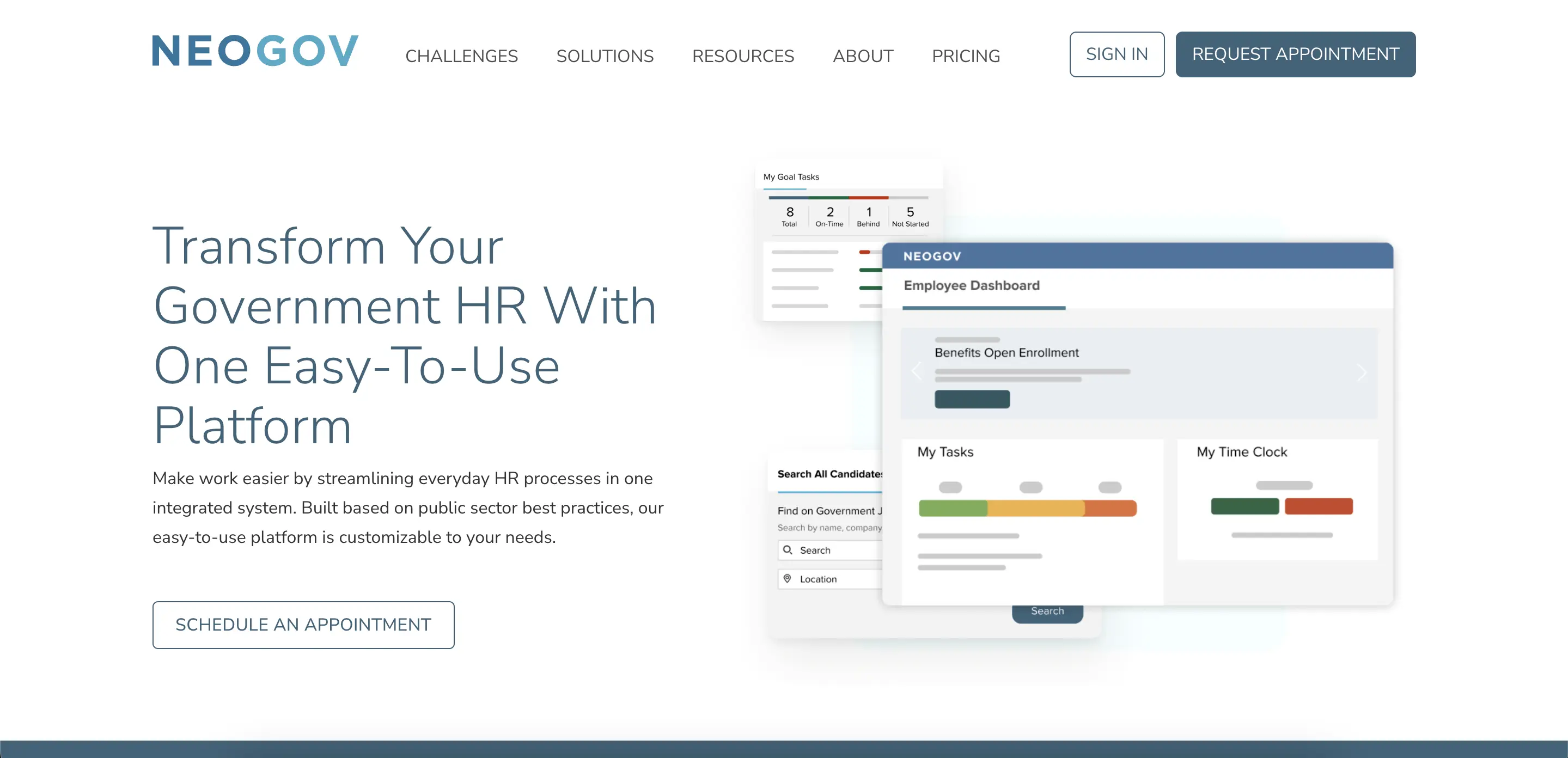
NEOGOV, doing business as Governmentjobs.com Inc., is a cloud-based human capital management platform built exclusively for government agencies, public safety departments, and educational institutions. CEO Shane Evangelist leads the company, which operates as an EQT portfolio company backed by the Canada Pension Plan Investment Board.
NEOGOV Features Review
NEOGOV's suite splits into talent acquisition products, Insight, Attract, GovernmentJobs, and Vetted, alongside employee management products covering onboarding, performance, learning, and core HR. Here's what I found testing each one directly:
Insight (Applicant Tracking)
Insight centralizes job requisitions, candidate scoring, and eligibility list management. It features configurable workflows that route approvals by department or job type. I posted a test requisition with supplemental screening questions.
Applicants who didn't meet the minimum qualifications were automatically filtered out before a recruiter opened their file. However, this "automatically filtered out" feature will result in a lawsuit due to recent recruitment laws in the US.
Moreover, PII blinding hides identifying information during review to support fair hiring. Self-scheduling allows candidates to book interviews without back-and-forth emails. Insight includes over 100 out-of-the-box reports covering time-to-hire and EEO data.
The auto-screening evaluates fixed criteria like supplemental questions and residency rules. This means a recruiter still reviews qualified applicants manually to assess their fit for the role.
Attract (Candidate Relationship Management)
Attract's Virtual Recruiter automatically identifies candidates in the existing applicant pool who match a new opening. It sends personalized outreach with just a few clicks, which is especially important for roles that are hard to fill, like correctional officers or engineers.
I built a test landing page for a mock hiring event using the built-in website builder, and publishing it required no IT support.
Bulk email campaigns and real-time analytics track which sourcing channels produce the most hires. NEOGOV reports that agencies see an average 24% increase in applicant volume using Attract's outreach tools. This feature works best for agencies with an existing applicant history. Brand-new agencies start with a smaller pool to source from.
GovernmentJobs (Job Board)
GovernmentJobs.com puts open roles in front of over 20 million registered public sector job seekers. Jobs posted through Insight automatically publish here without a separate posting step. I checked how a test listing performed in Google search results. Public sector job board listings consistently ranked above generic job board results for the same role.
Applicants have a persistent profile where they can track every application, schedule interviews, and sign offer letters without re-entering information for each new role. This job board reportedly accounted for about 40% of state and local government jobs filled in recent years. This explains why agencies treat it as a default posting destination rather than an optional add-on.
Vetted (Background Investigation)
Vetted replaces paper-based background investigations with a centralized portal. It covers personal history statements, waivers, reference checks, and disqualification tracking, specifically for public safety hiring. I walked through the investigator dashboard, and configurable checklists kept every step visible without needing a separate spreadsheet to track progress.
Applicants transferred from Insight have their information auto-populate into Vetted, eliminating duplicate data entry. PHS logic and flags highlight disqualifying answers early. This allows investigators to focus on qualified candidates instead of reviewing every applicant equally. Final reports generate as a PDF with a one-click approval workflow.
Agencies outside public safety hiring, where standard background checks suffice, likely won't need this level of investigative depth.
HRIS (Core HR, Payroll, Benefits, Time & Attendance)
HRIS consolidates employee records, payroll processing, benefits administration, and time and attendance into a single login. It pulls data directly from Insight and Onboard, so new hires never require duplicate entry. I traced a test employee from hire through a mock pay cycle, and attendance data synced into payroll without a manual export step.
Employees can access pay stubs, benefits information, and direct deposit changes through self-service. Time clock features include geotracking for field staff. This module works well for agencies consolidating from separate payroll and HR systems. Unusual payroll scenarios may need a workaround, which is worth testing against your agency's specific pay rules during a demo.
Onboard
New hires complete required paperwork, review policy acknowledgments, and access training materials through a self-service portal before their start date. I walked through a mock onboarding sequence, and every completed form flowed directly into the employee's permanent HRIS record without re-entry.
Task assignments notify managers and IT automatically when equipment or system access needs setup. Digital forms replace the printing and mailing that public sector onboarding traditionally required. Of all the products in the suite, this one felt the smoothest and most immediately useful when I tested it.
Perform (Performance Management)
Perform centralizes feedback, automates evaluation timelines, and links individual goals to departmental and budgetary objectives. I set up a mock review cycle, and the evaluation timeline automated reminders for both the employee and manager. This eliminates the need for HR to track due dates manually.
Standardized evaluation templates help agencies apply consistent criteria across departments. This is important for public sector fairness and defensibility requirements. Individual performance assessment workflows feel less intuitive than the recruiting side of the platform. They require more clicks to complete a full review cycle.
Learn (Learning Management)
Learn assigns and tracks required training, certifications, and professional development content throughout an employee's tenure. I assigned a test compliance course, and completion status is logged automatically against the employee's record. This is useful for agencies that need audit-ready training documentation.
The system tracks progress, scores, and certificate expiration. This helps agencies flag renewal deadlines before they lapse. Reporting on training completion supports accreditation and compliance audits common in public safety and education. The course content library feels dated compared to newer, consumer-style learning platforms.
eForms & Policy
eForms digitizes employee documents and routing tasks that previously required physical signatures and paper filing. Policy manages the full lifecycle of agency policies from drafting through distribution and acknowledgment tracking.
I routed a test form through an approval chain, and each approver received a notification without needing to check the system manually.
Both modules are important for public sector records retention requirements. Agencies must prove a policy was distributed and acknowledged, not just published. Case studies from agencies using eForms describe eliminating stacks of physical paperwork that previously required manual filing and storage.
Assistive AI Tools
NEOGOV takes a deliberately narrow approach to AI. The company is clear: AI never makes hiring decisions, and applicant data is never used to train public AI models.
Smart Recommendations in Insight suggest refinements to job requirements, salary ranges, and experience thresholds based on public sector hiring context. I tested it against a mock posting, and the suggested adjustments were specific to civil service classification norms, not generic job-ad advice.
JobTarget, added through an integration, automatically distributes job ads across targeted boards and optimizes budget allocation.
None of these tools evaluate or rank candidates. NEOGOV's FAQ confirms that AI "analyzes information and offers recommendations," while screening and selection remain entirely in human hands. This is a deliberate design choice, not a gap in ambition.
NEOGOV Pricing Review: Is It Worth the Investment?
NEOGOV prices by module: Recruit, Develop, Manage, and Comply, with the final quote depending on agency size and which modules an agency selects. There's no published rate card, and every agency goes through a custom quote process.
The module structure ensures the quote increases with each module an agency incorporates. For instance, an agency using only Insight for recruiting pays much less than one adding HRIS, payroll, Learn, and Vetted.
Implementation and data migration costs can significantly raise first-year expenses, particularly when moving historical records. A comprehensive quote can help avoid future budget surprises.
NEOGOV Security and Compliance
NEOGOV holds FedRAMP certification, which it achieved in September 2025. This certification is based on NIST 800-53 Moderate controls and is monitored continuously. It directly enabled NEOGOV's partnership with the Department of Veterans Affairs and places the company among fewer than 350 cloud providers that have completed the FedRAMP authorization process.
The platform also has SOC 2 Type II certification, CJIS certification relevant to Vetted's public safety background investigation work, and complies with HIPAA security rules.
Data is encrypted both in transit and at rest using FIPS-compliant standards, with TLS 1.2 required for all access. For agencies with strict procurement security requirements, this security posture is tailored specifically to what government buyers need, rather than a generic enterprise checklist.
NEOGOV Pros & Cons
Strengths of NEOGOV
Based on my evaluation and verified user reviews, here are the standout pros of NEOGOV:
- Native Civil Service Compliance: Agencies consistently reported features like eligibility lists, PII blinding, and canvassing letters as offerings that a generic HR platform simply doesn't provide. These features exist because public sector law requires them.
- Deep Product Integration Across the Hiring Lifecycle: Users describe the transition from Insight to Vetted to Onboard to HRIS as seamless. Candidate data flows through every stage without the need for duplicate entry.
- Responsive, Public-Sector-Fluent Support: Customer support receives repeated praise for understanding government-specific workflows. They do not treat agencies like a generic enterprise account.
- GovernmentJobs.com Reach: Users highlight the built-in access to a public sector-specific talent pool as a clear advantage over posting solely on general job boards.
- Minimal Training Required to Get Productive: New HR staff and hiring managers consistently find the learning curve manageable. A wide majority of surveyed customers rate job posting and candidate tracking as the platform's most immediately useful features.
Limitations of NEOGOV
Despite these strengths, the same users reported several cons of NEOGOV that you should be aware of:
- Module Costs Add Up Quickly: Implementation fees and per-module licensing can significantly increase total costs, especially for smaller agencies that add modules incrementally.
- Reporting Customization Feels Restrictive: Some verified users want better export options and more flexible tools for complex, cross-module data analysis beyond the built-in reports.
- Occasional UI and Workflow Quirks: Several agencies report outdated interface elements and onboarding workflow bugs that sometimes require admin workarounds.
- No AI-Driven Candidate Scoring: Insight screens rely on fixed supplemental questions and residency rules instead of evaluating resumes against the full job description. As a result, ranking qualified applicants still falls to a recruiter.
- No Talent Rediscovery of Past Candidates: Aside from Attract's outreach to existing applicants, there is no way to automatically resurface strong past candidates when a similar role opens later.
- Learning Content Library Feels Dated: Several agencies find that Learn's course catalog does not compare well to newer, consumer-style learning platforms.
How Integrating Skima AI Can Handle NEOGOV's Limitations
Insight screens applicants based on fixed supplemental questions and residency rules. It does not conduct a full evaluation of resume content against the job description. Therefore, recruiters still manually review every qualified applicant to assess their fit for the role.
Past applicants do not automatically rediscover candidates for a new opening unless a recruiter actively searches for them through Attract. Agencies using NEOGOV integrate Skima AI to address both gaps without changing the existing hiring workflow. Here’s what the integration provides:
- Job Description Compliance Check: Before a role goes live, Skima AI reviews the job description for language that could introduce legal, bias, or compliance risks. It flags issues before they affect the candidate pool.
- AI Candidate Screening: As candidates apply for a role synced from NEOGOV, Skima AI evaluates each resume against the job's actual requirements. It automatically ranks the pool, allowing a recruiter to open a prioritized shortlist instead of reviewing every qualified applicant by hand.
- Talent Rediscovery for Candidate Database: Skima AI scans an agency's existing NEOGOV candidate database for individuals who applied or were screened before but were never hired. It surfaces qualified matches for a new opening without requiring a recruiter to start from scratch.
- Candidate De-Duplication and Enrichment: Skima AI automatically merges duplicate candidate records matched by email, phone, LinkedIn URL, or a combination of name, location, and company. It fills in missing profile fields from context, keeping an agency's NEOGOV database clean instead of accumulating the same applicant under multiple entries.
- Explainable Match Scoring Behind All Three: Every candidate (new, rediscovered, or de-duplicated) receives a score with specific reason bullets covering skills, experience, and certifications. This approach provides transparency, allowing a recruiter to see exactly why a candidate ranked where they did.
Who Is NEOGOV Best For?
NEOGOV is best for local and state government agencies, public safety departments, and higher education institutions requiring civil service compliance and strong security. It's perfect for agencies tied to civil service rules that generic HR software can't manage.
With FedRAMP-level security for federal contracts, it supports extensive background checks for public safety roles. Additionally, it unifies recruiting, onboarding, payroll, and compliance, backed by 25 years of experience in the public sector.
Who Should Avoid NEOGOV?
Avoid NEOGOV if you’re a private-sector company, as it's designed for government compliance. It’s also not suitable for small agencies with limited budgets, as costs can escalate. Additionally, if you require integrated AI-driven candidate scoring, a modern learning library, or a flat pricing structure, consider alternatives.
Final Verdict: Should You Buy NEOGOV?
Yes, if you're a government agency, public safety department, or educational institution that needs compliance features that generic HR platforms don't provide, and you're okay with defining your module purchase based on your agency's needs.
The September 2025 FedRAMP certification and 25 years of experience in developing products for the public sector make NEOGOV a reliable choice for all levels of government, from small municipalities to federal agencies.
However, if you're outside the public sector, or require AI-driven candidate scoring as a primary feature, consider other options. For agencies prioritising compliance and security specific to government needs, NEOGOV stands out as a reliable option in this field.
Frequently Asked Questions
1. What is NEOGOV?
NEOGOV is a cloud HR and talent-management platform built for public-sector employers. It provides applicant tracking, onboarding, learning, performance, and compliance tools to standardize government hiring and records management.
2. Is NEOGOV legit?
Yes, NEOGOV is a legitimate vendor serving thousands of public agencies and educational institutions, with verified customers, formal implementation services, compliance features, and documented customer support and case studies.
3. How much does NEOGOV cost?
NEOGOV uses consultative, per-module pricing based on agency size and modules selected. You must request a custom quote; expect annual licensing, implementation fees, and variable costs tied to FTE counts and configuration.
4. Does NEOGOV integrate with Skima AI?
Yes, NEOGOV Insight supports integrations, and Skima AI can connect to enhance candidate matching, parsing, and rediscovery. Integration typically requires API access, configuration, and vendor coordination for secure data exchange.
5. How does Skima AI improve NEOGOV workflows?
Skima AI adds explainable match scores, intelligent resume parsing, and candidate rediscovery within NEOGOV records. It reduces screening time, surfaces qualified past applicants, and preserves audit trails for compliant decision-making.
6. Is NEOGOV suitable for private companies?
NEOGOV primarily targets government and education; private companies may find its compliance features unnecessary. Startups and scales needing extensive third-party integrations prefer a commercial ATS with broader ecosystem support today.


